How to File KRA Returns on WhatsApp Using Shuru Chatbot (2026)
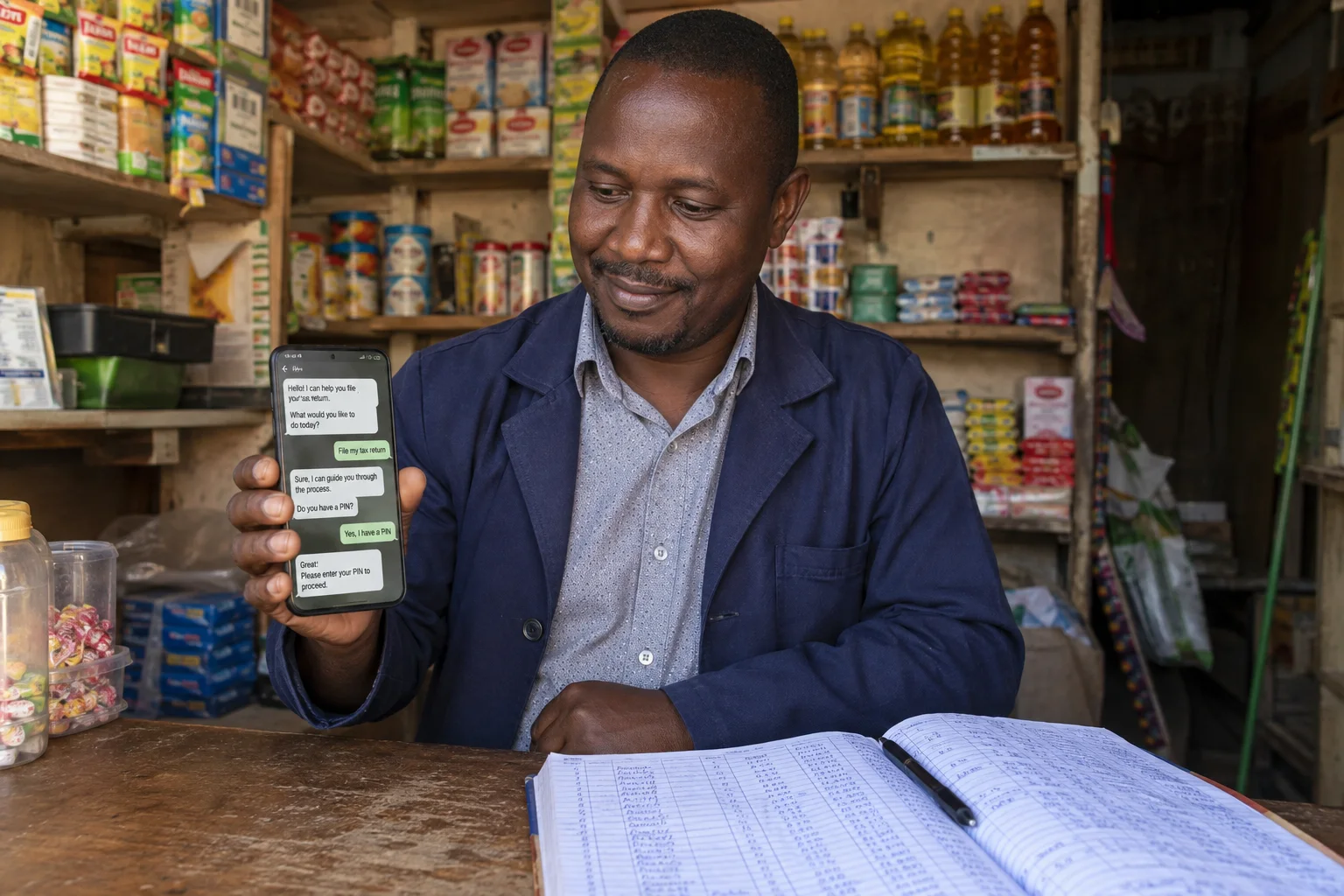
The Kenya Revenue Authority (KRA) has launched an AI-powered WhatsApp chatbot called Shuru that lets you file tax returns, generate eTIMS invoices, check your KRA PIN, and access compliance certificates — all without logging into the iTax portal. Shuru is one of KRA’s digital services; filing options depend on the current menu and the user’s tax obligations.
Save this number now. Send "Hi" or "Menu" via WhatsApp to get started. International format: +254 711 099 999.
Opens WhatsApp with your message ready to go. Free to use.
1. What Is Shuru? KRA's WhatsApp Tax Chatbot
Shuru (also referred to as Shuru GPT in KRA's official communications) is an AI-powered conversational assistant launched by KRA to simplify tax compliance. According to KRA's official press release, the platform "allows taxpayers to access pre-filled details, file returns, generate invoices, and obtain compliance certificates directly through WhatsApp."
The chatbot is part of KRA's broader digital transformation strategy aimed at simplifying compliance and expanding the tax base. KRA describes Shuru as part of its digital services for taxpayers.
2. The Official KRA WhatsApp Number
The only official KRA WhatsApp number for the Shuru chatbot is:
Save this number to your phone contacts. Open WhatsApp, find the saved contact, and send the word "Hi" or "Menu" to wake up the Shuru chatbot. The service is free to use — standard WhatsApp data charges may apply.
- Only one official number: 0711 099 999 (international: +254 711 099 999). Any other number claiming to be KRA on WhatsApp is a scam.
- Look for the blue verification badge ✓ next to "Shuru" in WhatsApp — this confirms it is the official KRA account.
- KRA will NEVER ask for your password, M-Pesa PIN, or bank details. Ignore unsolicited WhatsApp messages asking for payment; if Shuru shows an official payment option in its verified menu, follow only that menu and verify the payment details before authorising. Shuru may ask for your KRA PIN or ID number for identity verification.
- KRA will NEVER send you unsolicited messages asking for payment. Always initiate the conversation yourself by sending "Hi" to the official number.
- If you receive suspicious calls or messages claiming to be KRA, report via KRA's official staff verification tool at kra.go.ke or call the KRA Contact Centre.
3. What Services Does Shuru Offer?
Once you message Shuru, you get a menu with the following services:
| Service | What You Can Do |
|---|---|
| 📄 File Returns | Use the current Shuru menu to check which return-filing options are available for your obligations; options can vary. Pre-filled data is available for employed individuals where supported. |
| 🧾 eTIMS Invoice | Generate eTIMS-compliant invoices with downloadable PDFs. Enter items, quantities, and prices step by step. |
| ✅ PIN Check | Verify your KRA PIN status and tax obligation details. |
| 📋 TCC Application | Apply for a Tax Compliance Certificate — needed for tenders, contracts, and financing. |
| 💳 Make Payment | Pay taxes directly through the chatbot. |
| 👤 Talk to Agent | Escalate issues or speak to a KRA customer service representative. |
KRA has announced that eTIMS invoice generation is available through Shuru.
4. Step-by-Step: How to File KRA Returns on WhatsApp
The steps below show what happens in a Shuru chat, with screenshots of the conversation.
Start the Conversation
Tap the 0711 099 999 number or save it to your contacts and open WhatsApp. You'll see Shuru's profile — the official KRA chatbot with a blue verification checkmark ✓ next to the name. Always check for this badge — scammers imitate KRA but cannot get the official blue verification tick. Send "Hi" to get started.
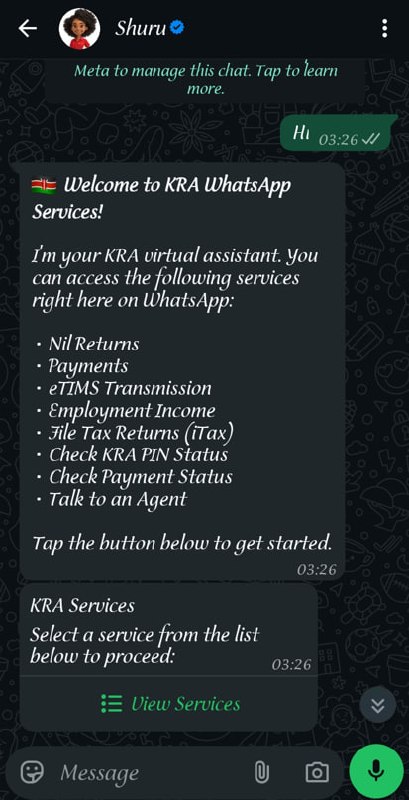 Shuru responds immediately with a welcome message and a "View Services" button. Source: Actual Shuru conversation.
Choose a Service
Shuru shows you the services available. Tap the "View Services" button to see the full menu with radio buttons. You can choose from:
- Nil Returns — File if you had no income
- Payments — Pay taxes via Bank or M-Pesa
- eTIMS Transmission — File from eTIMS data
- Employment Income — File PAYE returns
- Payment Status — Check if your PRN was paid
- Check KRA PIN — Verify your PIN status
- Talk to an Agent — Chat with a live support agent
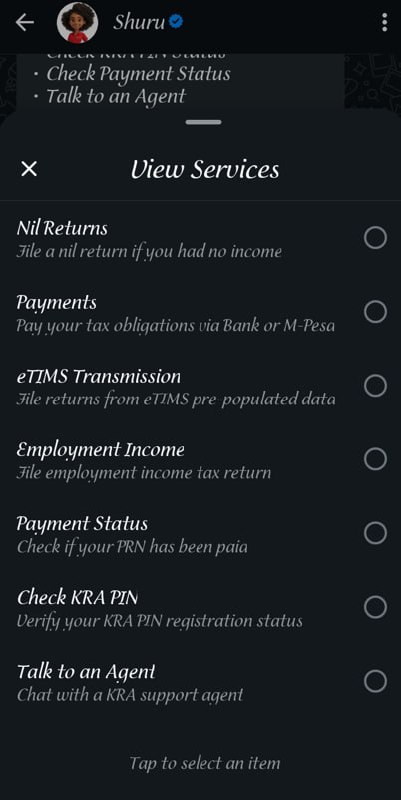 The interactive menu lets you select any service by tapping the radio button.
Enter Your ID or KRA PIN
Let's say you pick Nil Returns. The selection appears as your message. Shuru then asks for your KRA PIN or National ID number. Either one works — they are linked in the KRA system.
Type in your ID or PIN. Shuru looks it up and confirms: "KRA PIN found" or "ID number found" (depending on what you entered). Your details are displayed so you can verify they are correct.
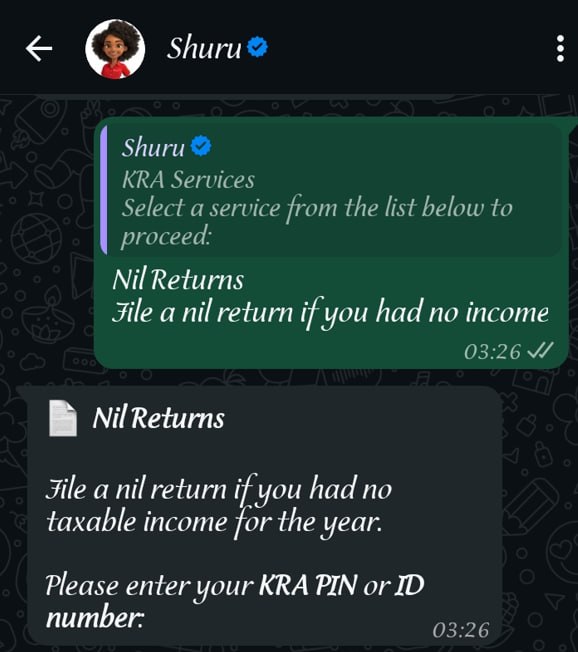 Shuru asks for your ID or PIN — whichever is easier for you.
Verify with OTP
Shuru sends a one-time password (OTP) to your registered mobile number. The number is displayed with stars for privacy (e.g., 07** *** **9).
The SMS comes from KRA Care and reads: "Your KRA verification code is [code]. Do not share this code."
Copy the OTP from the SMS, switch back to the chat, and paste it. Shuru responds: "OTP verified successfully."
Review and Submit
Shuru validates your details: "Validating your KRA PIN and checking filing status. Please wait."
You then see a confirmation summary with your details:
Tax return confirmation for [your name], KRA PIN [your PIN],
Year of income: 2025 (01-01-2025 – 31-12-2025)
Income: KES 0 (Nil return)
No employment income or PAYE credits found for this year.
Two buttons appear: a ✓ tick to submit or an ✕ X to cancel. Tap the tick to proceed. Your message reads: "Submit nil returns."
Shuru processes your submission: "Submitting your nil return to KRA. Please wait."
Done! You're All Set
Shuru confirms: "Nil return filed successfully." It shows your taxpayer name, KRA PIN, year, and status. The chatbot then asks: "What would you like to do next?"
Tap "Main Menu" to return to the service list and access other KRA services — or simply close the chat. Your return is filed.
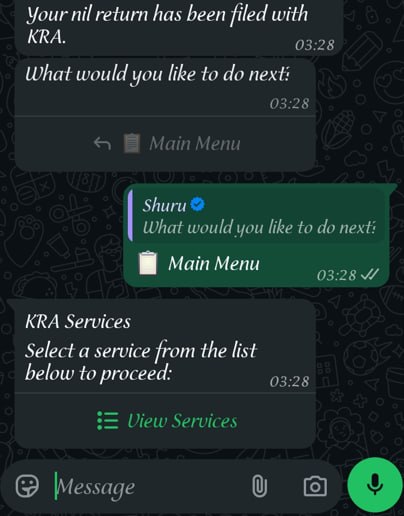 Your nil return is filed. Tap "Main Menu" to access other services or close the chat.
Free to use. Standard data rates may apply.
5. Generating Invoices through Shuru
KRA confirms that Shuru can generate invoices through WhatsApp. Check the invoicing service offered in your account’s current menu; its availability and the details requested depend on the service and your registration.
- Save 0711 099 999 and send "Hi" or "Menu" to the official KRA account.
- Choose the invoicing option offered and follow the identification prompts in that official chat.
- Enter the requested buyer and transaction details, including the goods or services, quantity and price.
- Check the invoice details before confirming, then use the download or sharing option provided.
For VAT and other eTIMS requirements, use the solution appropriate to your registration. Our eTIMS guide explains the available routes. The current Shuru menu determines the button labels and delivery options; the instructions here do not depend on a fixed PDF-link format.
6. Who Can File on WhatsApp?
The Shuru chatbot is designed for a wide range of taxpayers:
- PAYE Employees — Most straightforward. Your data is pre-filled; just review and confirm.
- Small Business Owners — File TOT or business income returns through WhatsApp.
- Freelancers and Gig Workers — Declare additional income from freelance, consultancy, or online work.
- Rental Income Earners — File rental income tax through the chatbot.
- Nil Return Filers — Taxpayers should file returns for the tax obligations registered on their PIN when those returns are due. A nil return is required only where applicable for that obligation and period; check KRA’s guidance. Shuru’s available nil-return options depend on its current menu and your tax obligations.
- VAT-Registered Businesses — Check the current Shuru menu for available returns; the tax types supported for filing may vary.
7. Tax Filing Deadlines 2026: What You Need to Know
There has been confusion about filing deadlines. Here is the accurate picture based on KRA's official communications:
| Your Situation | Deadline | Status |
|---|---|---|
| Paying the 2025 income-year balance of tax (payment deadline was 30 April 2026) | 30-04-2026 (balance payment) | Passed — pay the outstanding balance or ask KRA about a payment arrangement; late-payment charges may apply. |
| Filing the 2025 income-year return, including a nil return (filing deadline was 30 June 2026) | 30-06-2026 | Passed — deadline for the 2025 year of income |
| Filing the 2025 income-year return: PAYE only (tax fully deducted by employer; filing deadline 30 June 2026) | 30-06-2026 | Passed — deadline for the 2025 year of income |
| Filing the 2025 income-year return: business at a loss (filing deadline 30 June 2026) | 30-06-2026 | Passed — deadline for the 2025 year of income |
The official KRA filing window for the 2025 year of income (01-01-2025 – 31-12-2025) was 01-01-2026 to 30-06-2026, as stated on KRA's official website (kra.go.ke/file-my-returns).
Monthly returns have different deadlines:
- TOT returns: Due by the 20th of each following month
- VAT returns: Due by the 20th of each following month
- PAYE returns: Filed by employers by the 9th of each following month
Enacted change: The Finance Act 2026 has been enacted. KRA says that from 1 January 2027, individual taxpayers, self-employed people and partnerships file by the fourth month; calendar-year returns are due 30 April. Companies and other non-individuals file by the last day of the sixth month after their accounting period ends. This applies to filing from 2027 for the 2026 year of income where the year ends on 31 December; confirm the deadline for your accounting period with KRA.
KRA has warned that habitual filing of nil returns is not acceptable for businesses. If you operate a business and earn income, you must declare that income — you cannot repeatedly file nil returns. KRA stated on 30-03-2026: "If you get income from your business, you cannot declare NIL returns."
Only file a nil return if you genuinely had no income at all during the tax year (e.g., unemployed, student, or dormant business). If you earned a salary, file an employment income return — not a nil return.
- Late filing of annual income-tax returns: the amount depends on the taxpayer type and tax due; check KRA’s current guidance.
- Late filing of a TOT return: KES 1,000 per month.
- Late VAT filing: KES 10,000 or 5% of tax due, whichever is higher.
- Late VAT or TOT payment is separate: 5% penalty plus 1% monthly interest on unpaid tax.
Filing penalties and payment penalties/interest are separate provisions. Confirm the amount for your obligation with KRA.
8. What About USSD?
If you don't have WhatsApp or a smartphone, KRA also offers a USSD service. Dial *222#5# on any phone to access KRA services including PIN checks and filing assistance. This is part of KRA's effort to reach taxpayers without smartphones.
9. Is Shuru Secure?
KRA uses OTP verification, your National ID, and KRA PIN before granting access to any data. KRA Commissioner George Obell told Business Daily Africa: "We have systems in place to secure user data."
However, some privacy advocates have raised concerns about taxpayer data on a Meta-owned platform. If this worries you, you can still file through the iTax portal instead.
10. Frequently Asked Questions
What if I lost my KRA-registered phone number?
Visit your nearest KRA Tax Service Office with your ID to update your registered mobile number. The OTP verification will not work with an old number.
Can I file for someone else using Shuru?
Shuru requires OTP verification to your own registered number, so you cannot file on behalf of another person. Each taxpayer must file using their own phone.
Does Shuru work outside Kenya?
Yes, if you have WhatsApp access. Use the international format: +254 711 099 999. The OTP will still go to your KRA-registered Kenyan number.
Can I use Shuru for past tax years?
Shuru supports filing during KRA's open filing periods (the January–June 2026 window covered the 2025 income year). Confirm the current window with KRA; for prior year returns, use the iTax portal.
What if Shuru doesn't recognise my PIN?
Ensure your PIN has income tax obligation. If you only registered for VAT or as a withholding agent, you may need to update your tax obligation on iTax first. Contact KRA at 020 4999 999 or visit a KRA office.
Sources and update record
Updated 26 October 2026: Confirmed Shuru invoice generation against KRA’s announcement, tied menu instructions to the current service and corrected the balance-payment action.
Scope-specific check: The enacted 2027 filing-date change and the distinction between TOT and VAT filing penalties, late-payment penalties and interest were checked against KRA guidance on 11 October 2026. The full guide was reviewed on 12 October 2026; the source list below retains each source’s actual check date. The table keeps the original 2025 filing dates and marks the June deadline as past, checked 11 October 2026.
- Start Chatting with Shuru on WhatsApp
- KRA Official Press Release — Q3 FY2025/26 announcement on WhatsApp chatbot rollout (kra.go.ke)
- Nation Africa — “KRA targets 22m new taxpayers with WhatsApp chatbot ‘Shuru’” (nation.africa)
- People Daily — “KRA introduces WhatsApp tax filing” (peopledaily.digital)
- NTV Kenya — KRA Shuru chatbot coverage (facebook.com/NTVKenya)
- Top News Kenya — “How to Use KRA’s Shuru Chatbot on WhatsApp: A Simple Step-by-Step Guide” (topnews.ke)
- KRA Official X (Twitter) — @KRACare official announcements and warnings
- Darc’s personal Shuru conversation — Actual screenshots of the nil returns filing flow (privacy-redacted)
- KRA official website
- KRA — Finance Act 2026 filing timelines
- KRA — Turnover Tax (TOT)
- KRA — Offences and penalties
- KRA — Shuru invoicing and return-filing announcement, April 2026
Stay updated
 Stay updated
Get the next guide in your inbox.